
7 min read
You’ve worked hard to build your savings, your reputation, and your independence. So it’s more than annoying when criminals try to take it with a text message, a fake phone call, or a login screen that looks “almost right.”
One of the fastest-growing threats is account takeover fraud (ATO). In plain language, ATO happens when a criminal gets into an account you already have—then changes the password or contact details so you can’t get back in, and uses the account to move money, make purchases, or open new accounts in your name.
The good news: a few habits can make it much harder for criminals to get traction—and help you spot trouble sooner.
What is account takeover (ATO)?
Account takeover is when someone gains unauthorized access to your online account and takes control. That might be a:
- Bank or credit card account
- Retirement plan portal (401(k), IRA, HSA)
- Email account (often the “master key” to password resets)
- Shopping or payment app
- Mobile phone account (used to intercept security codes)
Once inside, criminals may:
- Change your password or recovery email/phone
- Add a new payee or payment method
- Initiate transfers or purchases
- Use your identity to apply for credit elsewhere
Because your account may still “look normal” at first glance, the damage can spread before you get a clear warning.
Common ways criminals get in
Most ATO starts with a setup—a trick, a look-alike site, or malicious software.
Social engineering (the “human” hack)
Social engineering means criminals manipulate you into giving them what they need. They may pose as your bank, a retailer, a delivery service, tech support, or even a government agency. These messages often create urgency: “fraud alert,” “account locked,” or “confirm this charge.”
Phishing (fake messages)
Phishing is when a scammer sends an email/text/message that tries to get you to click a link, open an attachment, or share a password or code. CISA (the U.S. cybersecurity agency) describes phishing as “bait” designed to steal personal information or infect devices. (CISA)
Look-alike (phishing) websites
A fake website may look nearly identical to the real one. If you enter your username and password there, you’ve handed them over.
Search ads that lead to fake sites (search ad “poisoning”)
Criminals can buy ads that imitate legitimate companies. You search for your bank or a service, click the top “Sponsored” result, and land on a convincing fake.
Malware/spyware
Malware is harmful software. Spyware is a type of malware that watches what you do—sometimes capturing keystrokes or login details. It often comes from infected downloads, fake apps, or risky links.
Real-life account takeover scenarios (what it can look like)
Seeing how account takeover (ATO) unfolds in the real world makes it easier to spot early warning signs. These examples are common patterns—not predictions—and they can happen to anyone.
1) The “fraud alert” text + a fast follow-up call
You get a text that says, “Did you authorize this purchase?” and it looks legitimate. Before you can think it through, your phone rings—someone claiming to be “security” says they can stop the charge, but you must act right now. They ask you to read a one-time code or click a link to “verify” your account.
What’s really happening: that code or link can help them sign in as you.
2) The late-night “password reset” you didn’t request
You wake up to multiple emails saying your password was reset—then you can’t log in. A moment later, you receive a message: “Your contact information was updated.”
What’s really happening: once criminals get in, they often change the email/phone on the account so you’re locked out and they control the alerts.
3) The convincing look-alike sign-in page
You click a link from an email or text that appears to come from a company you use. The page looks exactly right—logo, colors, everything. You enter your username and password, and the site “spins” or gives an error.
What’s really happening: the page may be fake. You just handed your login details to someone else.
4) The “Sponsored” search result trap
You search online for a company’s customer service number or login page. The first result says “Sponsored” and looks official, so you click it. The site asks you to sign in—and soon after, you get alerts for a new device login or a new payee added.
What’s really happening: criminals sometimes buy ads that lead to look-alike sites designed to capture logins.
5) The “security update” or “new app” that isn’t real
A pop-up appears saying your device has a problem and you need to install a security update. Or an email says you must download a “new app” to keep access to your account. After installing it, your phone feels slower—or your accounts start sending you sign-in alerts.
What’s really happening: malicious software (malware) can record what you type, steal passwords, or monitor account activity.
6) The phone suddenly stops working (number hijacking)
You notice you’re not receiving calls or texts, or your phone shows “No Service.” Around the same time, you get emails that passwords are being reset on your accounts.
What’s really happening: in some cases, criminals try to move (“port”) your phone number to a different device so they can receive your security codes. This is sometimes called a SIM swap or number transfer scam.
A simple “pause” rule that can help
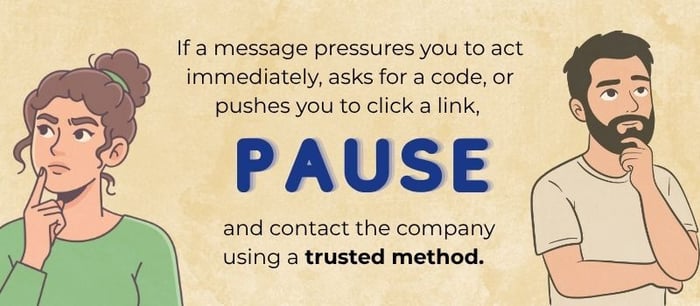
If a message pressures you to act immediately, asks for a code, or pushes you to click a link, pause and contact the company using a trusted method (the number on your statement, the back of your card, or the official website you type in yourself).
Warning signs checklist
Don’t ignore these signals:
- You can’t log in (and you’re sure the password is correct)
- You get password reset emails or security alerts you didn’t request
- You see logins from unfamiliar devices/locations
- New contact details, payees, or payment methods appear
- Transactions show up you don’t recognize
Steps that can help reduce your risk
No single step is perfect. But layering a few protections makes you a much harder target.
1) Use strong, unique passwords (and consider a password manager)
A password manager is an app that creates and stores strong passwords for you so you don’t have to memorize them. The key idea: one password per account (especially for email and financial logins).
2) Turn on multi-factor authentication (MFA)
Multi-factor authentication (MFA) means you need more than a password to log in—such as a code from an authenticator app or a prompt on your phone. MFA can make it significantly harder for criminals to break in, even if they have your password.
3) Treat unexpected messages as suspicious—especially urgent ones
If you get a text/call/email claiming to be your bank or another trusted organization, pause. Instead of clicking, contact the company using the phone number on your statement, card, or official website.
4) Set up account alerts
Many banks and credit cards let you turn on alerts for:
- Logins
- Password changes
- New payees
- Transfers and purchases over a set amount
These alerts can help you catch trouble earlier.
5) Keep passwords and devices updated and “clean”
Update or reset old or forgotten passwords, install updates promptly, download apps only from trusted app stores, and be cautious with links and attachments.
I was an eyewitness to a loved one’s email-password takeover. An old email address had been abandoned after the password was forgotten and Facebook had the old email address as the verification method. Someone (or some internet bot) gained access to the old email and then to the Facebook account. As my loved one was receiving error messages on their Facebook app, the hacker was then verifying everything via email and updating Facebook settings. The password was changed, the phone number to verify activity changed, and Facebook provided very little technical support to help. The account could be locked and the takeover reported, but there was no long-term solution to regain access. Thankfully, in this real-life scare, there were no long-term financial implications. But even something as simple as your social media account can store pictures, videos, conversation history, payment methods, and links to business pages. Larger implications aside, you could lose years of memories in pictures alone.
What to do if you think an account has been taken over
If you suspect account takeover (ATO)—meaning someone has gotten into an account and changed details or started activity you didn’t authorize—acting quickly can help limit the damage.
- Contact the company that holds the account (right away).
Use the phone number on the back of your card, your statement, or the company’s official website—not a number from a text, email, or pop-up. Ask them to lock or secure the account, reverse or stop any pending transfers if possible, and walk you through next steps. - Secure your email account next (if it’s tied to that login).
Email is often the “master key” criminals use for password resets. Change your email password and turn on multi-factor authentication (MFA) (an extra sign-in step, like a code from an authenticator app). - Change passwords anywhere you reused the same password.
If you used that same (or similar) password on other sites, update those too—starting with financial accounts and email. Consider using a password manager so every account can have a different password. - Review transactions and document what you find.
Look for purchases, transfers, added payees, or profile changes you don’t recognize. Take screenshots if you can, and write down dates, times, and any reference numbers you’re given. - Check your credit and consider a fraud alert or credit freeze.
A fraud alert tells lenders to take extra steps to verify identity. A credit freeze restricts access to your credit report, which can make it harder for someone to open new accounts in your name. The FTC explains how both work. (Consumer Advice)
You can also pull free weekly credit reports from the official site. (annualcreditreport.com) - Report the incident using trusted channels.
Report identity theft and get a step-by-step recovery plan through the FTC’s IdentityTheft.gov. (IdentityTheft.gov)
- Report cyber-enabled crime to the FBI’s IC3 site. (Internet Crime Complaint Center)
Tip: The FBI has warned that criminals sometimes create look-alike “IC3” sites to steal personal information—double-check you’re on the real site. (Federal Bureau of Investigation)
- If mail theft or altered checks are involved (“check washing”), the U.S. Postal Inspection Service has guidance and reporting steps. (USPS)
- For older adults, the National Elder Fraud Hotline can connect callers with a case manager and resources. (Office for Victims of Crime)
- AARP also offers a free helpline for scam victims and families. (AARP)
- If you’re helping a parent, spouse, or friend
Fraud is stressful—and criminals count on embarrassment and silence. The National Institute on Aging explicitly reminds people: don’t be ashamed—scams can happen to anyone. (National Institute on Aging) A calm, practical next step is often the most helpful thing you can offer. Afterwards, a review of cybersecurity basics can be helpful. (Better Business Bureau)
A quick note from CWM 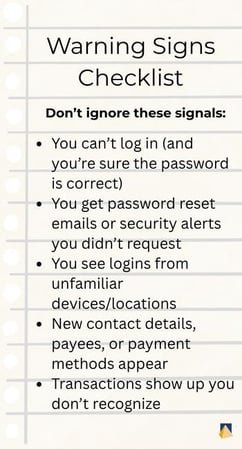
At CWM, we take an objective, integrated approach to helping clients make informed financial decisions while paying close attention to risk. If you’d like help organizing a “fraud response plan” (who to call, where key information is kept, and what to do first), we can help you build a simple checklist that fits your real life.
Related reading
- Cyber Security: Reduce Your Risk (Lakeside Chat 5-15-24)
- Your Digital Assets and Accounts: What Happens After You’re Gone?
- Why a Family Meeting on Finances is a Good Idea